Trac => OmniFocus Bookmarklet

A significant amount of my work comprises resolution of bug tickets, for the tracking of which Zenoss uses Trac. Since each of these usually corresponds to a single action in OmniFocus, I've been looking for an easy way to send a Trac ticket directly there (keeping a reference to the ticket in the notes field) other than typing it in manually, which is what I've been doing for months. Today I found it!First, I installed the OmniFocus URI Handler, which ingeniously parses URLs using the "x-omnifocus:" URI into OF actions. Since you can use OmniFocus's mail processing rules (e.g., "Do Something :: MyProject @ MyContext #Due // Note"), you can enter any kind of action you want by assembling the appropriate URL.

Once I installed this (trivial, just your basic .app dragged into /Applications), the rest was obvious. Here's the bookmarklet appropriate for my needs, with line breaks so it's readable:
javascript:<br />window.location="<br /> x-omnifocus://parsetasks?text=" +<br /> encodeURIComponent(document.title) +<br /> ":: Tickets @ Zenoss " +<br /> "#" + prompt("When is it due?") +<br /> "//" + encodeURIComponent(location.href);<br />

In my case, "Tickets" is the name of the single actions project into which I dump these, and "Zenoss" is the component I apply to them. I'm prompted for the due date (in a very non-GTD fashion, I use due dates as a rough way to manage priorities, in the absence of other mechanism), which, thanks to OF's acceptance of sensible expresions of time, I can enter like "3/3/2009" or "next thursday 5:30am". Finally, the ticket URL is put in the notes field.

Obviously, you'd want to customize the bookmarklet to suit your project and context, but this should provide you with a simple example. Here's the bookmarklet I use myself:

Trac > OmniFocus

Of course, this bookmarklet is generic enough that it'd work for any web page at all; it's just the title of the page and the URL.

Creative uses, anyone?


Read More...

Conserve pixels with CLI twitter client

I've been a little office-upgrade jag the past couple of days; Monday I ordered a Mirra, and today I set up a third monitor on my desk:


It's driven by my previously headless Ubuntu server; I use Synergy to share input devices. I'm using it mostly for things I want visible constantly—Skype, Pidgin, mail, iTunes—which yesterday consumed a dedicated virtual desktop using Spaces.app. If OmniFocus weren't OSX only it'd be there too.

Even with the annex, space is at a premium. I typically require two browser windows, at least two terminal windows, and the triptych MacVim to code effectively (at least, when focusing on UI work as I am now). This morning, I decided that Twitter client (I vacillate between Twhirl and TweetDeck) took up a tract of pixelage too juicy to ignore.

A quickly aborted foray into writing my own barebones plaintext Twitter client, followed by a more sober Google for such an obviously extant project, led me to Python Twitter Tools, exactly what I was looking for. Its basic usage is simple:

ian@iansmbp:~$ twitter
samuelmcc I have to revise an essay and read a 150 page book by 2pm tomorrow.
hb123 Now organizing my Google contacts (synced with iPhone) as a procrastination device.
pollack Every day loving New Mexican food, but just realized I also miss red beans & rice in Jackson.
marcambinder For 2010, O wants to cap non-defense disc. spending increases by .5 ... Federal workers get one percent raises.
hb123 @pollack I definitely didn't see them and I grew up in a 90% Catholic town. They all went in the evening, though.
marcambinder The significance of not being a tv correspondent, a newspaper writer or a lifestyle mag reporter dawns on me when i try to deal with the ...
chezaristote @neagle @hb123 Pretty much everything we said about J. Stewart as an ill-fitting Oscar host was recapped by John Oliver on Monday's D.Show.
pollack @hb123 So what is that a sign of european death?
chezaristote You know, I might be attracted to the Kindle if it showed me two pages at once. And would let me write notes in the margins. But maybe not.
KatherineD RT @bianconeri4ever: Saudi Arabia Starts Blocking Sections on @Digg! http://bit.ly/12B5de inexcusable! #Digg #Saudi #Freedom #netneutra ...

You can also ask for replies, DMs, etc. Posting to Twitter is equally simple:
ian@iansmbp:~$ twitter set My quippy one-liners are matchless!

The only gotcha I've run across so far is the necessity to escape apostrophes, but that comes naturally in a command-line environment.

Installation is trivial, thanks to the Cheese Shop:
ian@iansmbp:~$ sudo easy_install twitter

Also comes with an IRC bot. The man page does a decent job of outlining things.

So, if, like me, you decide that Twitter's not the kind of thing that necessitates a dedicated chunk of screen, this is a pretty good way to go. I've got a few enhancement ideas I may code up and see if they want. More on that if and when it happens.

Read More...

Organize your gadgets with pegboard

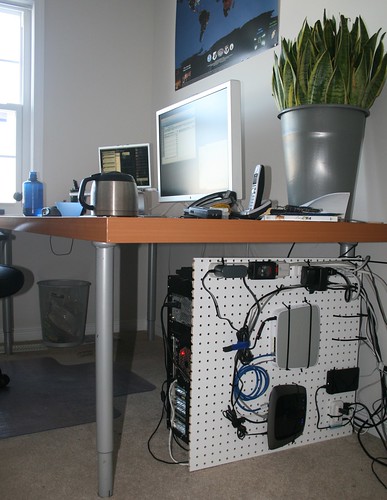
I finally had the opportunity to implement this Lifehacker tip last night. It's a great idea and works very well; recommended.

I'll add that I took the opportunity to rationalize my power strips. Now everything that doesn't need to be on all the time—monitor, printer, powered USB hub, etc.—is plugged into a single power strip, which can be switched off to save power (that Apple display, in particular, really sucks it down even when off). Everything network-related, which needs to be up all the time, is plugged into a different power strip or the wall.


My office, now with more desk space

Read More...

How to create a Zope resource package

Zenoss uses YUI as its JavaScript framework, and until now, we've always just committed the source to the main Zenoss source tree. Seeing as how we never actually modify it, version control seems a little overkill. Also, whenever we upgrade YUI, the changeset comprises the addition and removal of hundreds of files, which is completely unnecessary overhead. We don't need to track changes to YUI; Yahoo! already does that.

The solution was to package YUI into a Zope product that consisted of a single .egg; when the package is included, the YUI source directory is available as a resource in the browser. The same solution applies, of course, to any set of static files that merely need to be traversable—CSS, images, static data, whatever. It's trivially simple, but I couldn't find any clear tutorials. Plus I'm on a plane and don't feel like reading. Here's how to wrap any directory into a Zope product.

Throughout this, I'll be using the YUI package I created as an example. Obviously, you'd replace all instances of "zenoss" and "yui" with names appropriate to your package.


  1. Create the egg structure. Your best friend here is PasteScript (easy_install PasteScript if you don't have it already), which can generate skeleton structures from several different templates. In this case, you simply need an egg. You can either create the simplest kind of egg, or you can make a namespace package (for example, "yui" vs. "zenoss.yui"). I recommend the latter, if only to avoid conflicts with others who might have had the same idea:
    $ paster create -t basic_namespace zenoss.yui

    (If you just want a simple egg, use the basic_package template instead).

    Enter the namespace ("zenoss") and the package ("yui") and any other information you care to. You'll be asked for the basic egg metadata—license, description, author, etc. All is optional, but if you're going to distribute your package you should definitely provide this stuff. Don't worry, you can do it later by modifying setup.py.

    When you're done, you'll have an egg structure in the directory you specified (in this case, "zenoss.yui").

  2. Add the payload. Go down into the egg structure (In this example, zenoss.yui/zenoss/yui) and create the directory to hold your files:
    $ cd zenoss.yui/zenoss/yui
    $ mkdir src

    Copy any files you want available as resources into that directory. There's no need to create a yui directory inside the src directory; the entire resource directory will be available at /++resource++yui already (see below for a way to get rid of the ++resource++ cruft if so inclined), so if you created, for example, src/myfile.js, you would use the URL /++resource++yui/myfile.js to traverse to it.

    Now edit the new file zenoss.yui/MANIFEST.in (it'll be a sibling of setup.py) and add the following line:
    graft zenoss

    That tells setuptools to include every file underneath the directory zenoss; otherwise, it's likely to ignore most of the files you've added.

  3. Register src as a Zope resource directory. Edit the new file zenoss.yui/zenoss/yui/configure.zcml and add the ZCML necessary to wire the directory into Zope's publisher:

    <configure
    xmlns="http://namespaces.zope.org/zope"
    xmlns:browser="http://namespaces.zope.org/browser"
    >

    <browser:resourceDirectory
    name="yui"
    directory="src"
    />

    </configure>


  4. You're done. Test. You can now build an egg for use in any Zope application. Go up to the root of the package, where setup.py is located. Build the egg:
    $ python setup.py bdist_egg

    That'll create an egg in dist. Install that in whatever way you like, as long as it ends up in the Python path of your Zope environment—manually, with easy_install, or by including it in a buildout recipe. Then, somewhere in the ZCML chain of your Zope application, include the package:
    <include package="zenoss.yui"/>

    Now fire up Zope and try the URL ++resource++yui/anyfile.js against the root object, where anyfile.js is some file directly under src in your package. As I explained earlier, you should be able to get to anything in the src directory by mirroring the filesystem path in the URL, replacing src with ++resource++yui.


I mentioned a technique for removing the necessity to include ++resource++ as part of the URL. You may not want to do this; I only did it because all my template files already referred to /yui and I didn't feel like changing them. In the same package in your Zope application in which you included zenoss.yui, create a file called YUIShortcut.py (you can put it anywhere, of course, but this keeps things organized). If you're using Five:
from Products.Five.browser import BrowserView

If Zope 3:
from zope.publisher.browser import BrowserView

Then make a view that passes traversal off to the zenoss.yui resourceDirectory:
class YUIShortcut(BrowserView):
def __getitem__(self, name):
return self.context.unrestrictedTraverse(
'++resource++yui')[name]

Then wire it to the /yui URL in configure.zcml:
<browser:page
for="*"
name="yui"
class=".YUIShortcut.YUIShortcut"
permission="zope2.Public"
>

Now you should be able to hit /yui/myfile.js instead of /++resource++yui/myfile.js.

Read More...

Checking for open connection inside Zope thread

This won't be a ridiculously popular post, but I finally came up with a solution for an annoying problem that's been hounding me for a week, and I need to crow to somebody. As no one real is available, the Anonymous Interwebs™ will suffice (O anthropomorphized amalgam of TCP connections, I venerate your constancy!).

I've got this BrowserView that streams the contents of a file to the HTTPResponse until the file signifies (by uttering the safe word "<<<<<EOFMARKER>>>>>") that no further content is forthcoming:


def stream(self):
f = self.getFile()
offset = 0
f.seek(0, 2)
remaining = f.tell()
while True:
for line in self._generate_lines(f, offset, remaining):
if line.startswith(EOF_MARKER):
raise StopIteration
yield line
if self.finished:
break
offset = f.tell()
f.seek(0, 2)
remaining = f.tell() - offset
del f
time.sleep(0.1)
f = self.getFile()

As you can see, that's a generator that yields lines until EOFMARKER is seen, and then it finishes. The view iterates over the generator and writes the lines to the response. This works very well, other things being equal.

Unfortunately, that while loop keeps the thread alive. Normally, when the client closes the connection to the server (by navigating to a different page), the thread dies. Not in this case. I'm not totally clear as to the specifics, but the cause is certainly that infinite while loop. If the loop is particularly long-running, multiple requests to view the log stream could (and do) eat up all available threads in the pool (default 4, so the phenomenon is soon evident).

I tried loads of other arrangements of the same basic pattern, and came to the conclusion that there's really no good way to have this functionality without that while. So, had to check connection status as a condition of the loop's continuation. Eventually, digging into the guts of ZServer, I found a solution: sneak up from behind.


ZPublisher.HTTPRequest.HTTPRequest objects provide (almost) no information about the connection that spawned their existence—nothing like REQUEST.connection.is_open(), for example. Since REQUEST is the only relevant information available in this context, I was forced to call upon my hidden reserve of guile. I went to the source!

ZServer uses the standard asyncore library to handle its asynchronous sockets. Cursory investigation of the module yielded the very handy dictionary of all open connections:

(Pdb) asyncore.socket_map
{6: <ZServer.HTTPServer.zhttp_server listening 0.0.0.0:8080 at 0x5bbfa8>,
10: <ManagedClientConnection ('127.0.0.1', 8100)>,
11: <select-trigger (pipe) at 117f378>,
21: <ZServer.HTTPServer.zhttp_channel connected 127.0.0.1:55070
at 0x30a3148 channel#: 15 requests:>}

That last one was the socket I cared about. It disappeared at the right time, when the browser closed the connection. I just had to find some way for Zope itself to watch the open connections and stop streaming when the right one closed. This required me to correlate the REQUEST object to the connection, so it didn't stop working when somebody else closed their browser.

Luckily, REQUEST provided one piece of relevant information: the creation time of its channel. So all I had to do was check each of the open zhttp_channel connections for the same creation time; if none matched, the connection wasn't open anymore:

def is_browser_connection_open(request):
creation_time = request.environ['channel.creation_time']
for cnxn in asyncore.socket_map.values():
if (isinstance(cnxn, zhttp_channel) and
cnxn.creation_time==creation_time):
return True
return False

Then I just changed my streaming function to:

while is_browser_connection_open(REQUEST):

Worked like gangbusters. I've been sweating this issue for quite a while. Now, perhaps, I can sleep.

Read More...